Dynamic Text and Linking MathObjects
The classroom classic this chapter enables: a point moves along a curve while its coordinates update live on screen. Your students see the numbers change as the geometry changes (no more "imagine this value growing").
The method setLatex() of the LatexMathObject allows to change and recompile the LaTeX code, but there is another way to add text that changes its content while animating, using the Link class. Let's see this with an example. Suppose you have the following code in the runSketch() method, that rotates a red point along the unit circumference:
def A = point(
      at: [1, 0],
      style: [thickness: 30, drawColor: 'red']
)
animRotate(
    runtime: 5,
    obj: A,
    center: [0,0],
    angle: 2*PI
)
Suppose you want to show the coordinates of the point while the point moves. This can be accomplished advancing each frame and doing the proper changes to the LatexMathObject:
def A = point(at: [1, 0], style: [thickness: 60, drawColor: 'red'])

def anim = animRotate(obj: A, angle: 2 * PI, center: [0, 0], runtime: 5, run: false)

def text = latex(
    text:   r"$(1,0)$",
    anchor: 'upper_and_aligned_left',
    stack:  [screen: 'upper_left', gaps: [0.1, 0.1]]   // upper-left screen corner
)

scene.add(
    shape(type: 'circle',  style: [drawColor: 'darkgray']),
    shape(type: 'segment', from: [0, 0], to: A, style: [drawColor: 'cornflowerblue']),
    text
)

anim.initialize()
while (!anim.processAnimation()) {   // Main animation loop
    // Update the text with A's current coordinates
    text.setLatex(sprintf(r"$(%.2f, %.2f)$", A.v.x, A.v.y))
    scene.advanceFrame()
}
You will have the following animation:
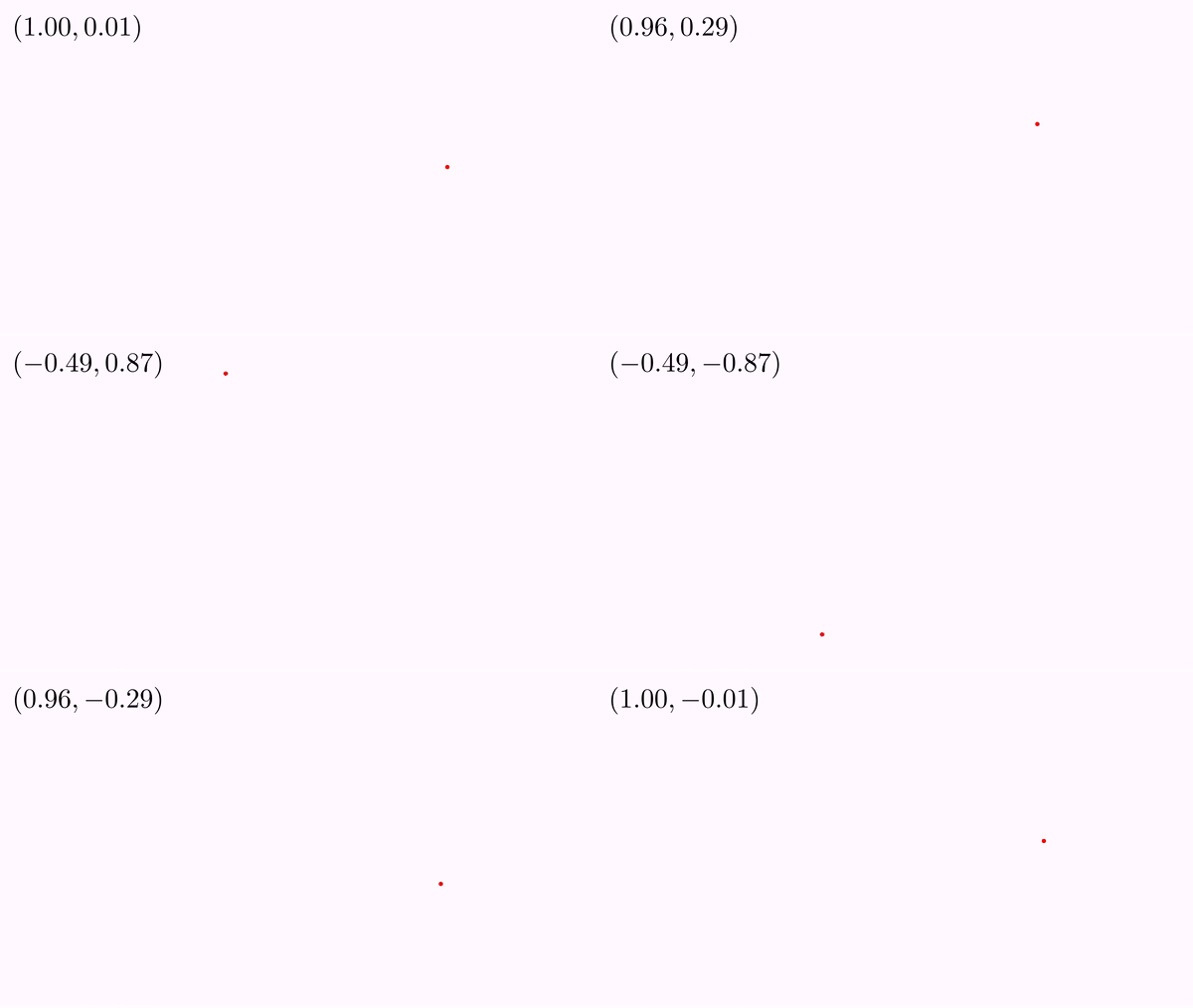
We will see another way to get this effect, using the Linkclass
Linking objects
A link is a method that is called immediately after the objects have been updated with the update() method and prior to render them. Basically, it gets an attribute of the "from" object and puts it in the "destiny" object.
We illustrate this with an example:
def A = point(at: [1, 0], style: [thickness: 60, drawColor: 'red'])

def text = latex(
    text:   r"$({#0},{#1})$",
    anchor: 'upper_and_aligned_left',
    stack:  [screen: 'upper_left', gaps: [0.1, 0.1]]   // upper-left screen corner
    format: "0.00"
)

//Ok, time to link some objects...
link(
    from: A, //From object A...
    fromType: ["x","y"], //...take the X and Y coordinates...
    to: text, //and put them in the object text...
    toType: ["arg0","arg1"] //in its first and second argument respectively
)


scene.add(
    shape(type: 'circle',  style: [drawColor: 'darkgray']),
    shape(type: 'segment', from: [0, 0], to: A, style: [drawColor: 'cornflowerblue']),
    text
)

//You can rotate the point directly without manually advancing frames
animRotate(obj: A, angle: 2 * PI, center: [0, 0], runtime: 5)
If you execute this code you will get the same result as before. Lets see what code we used. Look at the LaTeX code in the LatexMathObject:
def text = latex(text: r"$({#0},{#1})$" ....
The coordinates have now been replaced by the strings {#0} and {#1}. These are special escape strings that instruct JMathAnim to replace them with the values of the first and second arguments, respectively. In fact, a LatexMathObject can hold up to ten arguments, named {#0} to {#9}.
With the parameter format (or equivalently, the Groovy method text.setDefaultArgumentFormat()) you can set how the number will be formatted.
You can pass a String like "0.00" for example or a DecimalFormat object.
You can also set individual formats for arguments, for example, suppose we want to show the first number with only one decimal digit and the second one with 3. We can pass a list instead
format: ["0.0", "0.000"]
Or in pure Groovy code
text.setArgumentFormat(0,new DecimalFormat("0.0"))//The #0 argument will have this format
text.setArgumentFormat(1,new DecimalFormat("0.000"))//The #1 argument will have this format
The very same numbered-argument mechanism is available on TextMathObject (the text(...) DSL), which renders with a native font instead of compiling LaTeX. You can turn the example above into a plain-text version simply by replacing latex( with text(: the {#0}/{#1} placeholders, the format: parameter (single value or list), setDefaultArgumentFormat, setArgumentFormat and the ARG0/ARG1 links all behave identically. The same format: parameter is accepted by ctLatex(...). Just note that anchor: is LaTeX-specific; position a text(...) object through its stack: block instead, e.g. stack: [screen: 'upper_left', originAnchor: 'upper_left', gaps: [0.1, 0.1]]. Just replace in the previous example the code
def text = latex(
    text:   r"$({#0},{#1})$",
    anchor: 'upper_and_aligned_left',
    stack:  [screen: 'upper_left', gaps: [0.1, 0.1]]   // upper-left screen corner
)
by
def text = text(
    text:  r"({#0},{#1})",
    stack: [screen: 'upper_left', originAnchor: 'upper_left', gaps: [0.1, 0.1]]   // upper-left screen corner
)
Looking at the Groovy-way of doing things, here is how is done the linking process. To do so, we must create and register a link in the scene flow. This is done with this command:
def link1=scene.registerLink(A, //From object A...
        LinkType.X, //...take the X coordinate...
        text, //and put it in the object text...
        LinkType.ARG0 //in its first argument
)

def link2=scene.registerLink(A, //From object A...
        LinkType.Y, //...take the Y coordinate...
        text, //and put it in the object text...
        LinkType.ARG1 //in its second argument
)
The comments tell how it works. The first parameter is the source object, where to extract the information. The second parameter is a LinkType enum that defines the type of information. Depending on the object type and this value a certain value is extracted, and JMathAnim do its best to extract the appropriate information. For example in this case, X coordinate of the point is extracted. If A were a MathObjectGroupfor example, the x coordinate of the center of the object will be extracted.
The third and fourth parameters define the destiny object and the type of attribute to change in this object. In this case the value ARG0 means to change the value of the first argument.
Currently, the following LinkType values are supported:
public enum LinkType {
    X, Y, //Coordinates of a Point or the center of a MathObject
        VALUE, //If a vector, returns its norm. If a Mathobject, the distance from the origin to its center
        COUNT, //If a MathObjectGroup, returns the number of elements. If Shape, number of points
        WIDTH, HEIGHT, XMIN, XMAX, YMIN, YMAX,//Return these values from the Bounding Box of the object
        ARG0, ARG1, ARG2, ARG3, ARG4, ARG5, ARG6, ARG7, ARG8, ARG9 //Arguments of a LatexMathObject
};
If you want to stop the linking process, just unregister them from the scene:
scene.unregisterLink(link1) //Stops updating X coordinate
The link DSL
Instead of calling scene.registerLink(...) you can use the link DSL, which is more compact and accepts several destiny objects at once:
link(from: A, fromType: 'x', to: text, toType: 'arg0')
link(from: A, fromType: 'y', to: text, toType: 'arg1')
Both types accept a list, which registers one link per entry. The two links above can therefore be written as a single call:
link(from: A, fromType: ['x', 'y'], to: text, toType: ['arg0', 'arg1'])
Parameters:
from:the origin object. Only one object is allowed.fromType:the attribute to read from the origin:x,y,value,count,width,height,xmin,xmax,ymin,ymax,arg0...arg9. Prefix matching is allowed ('wid'meanswidth). It also accepts a list of them.to:the destiny object, or a list of objects. In the latter case an independent link is registered for each one.toType:the attribute to write in the destiny object(s), same accepted values asfromType, also accepting a list.function:an optional closure applied to the value before writing it into the destiny.
When both fromType and toType are lists they must have the same size. A single fromType is applied to every entry of a toType list (fromType: 'value', toType: ['arg0', 'arg1'] writes the same value into both arguments), but the opposite is rejected with an error, since several values cannot be written into the same destiny attribute.
//The width of both objects will be twice the x coordinate of A
link(from: A, fromType: 'x', to: [obj1, obj2], toType: 'width', function: { it * 2 })
The origin does not have to be a drawn object. A scalar(...), or any animatable value such as the t of a density plot, answers to fromType: 'value', which is the simplest way to put a number that an animation is moving on the screen:
def t = scalar(0)
def readOut = text(text: "t = {#0}", format: "0.00",
                   stack: [screen: 'upper_left', originAnchor: 'upper_left', gaps: [0.1, 0.1]])
link(from: t, fromType: 'value', to: readOut, toType: 'arg0')
animScalar(obj: t, to: 2*PI, runtime: 4)
The call returns the created LinkArguments when it registers a single link, or a list of them (one per destiny object and type pair) otherwise, so they can be stored and later removed with scene.unregisterLink(...).