Coloring Mathematical Formulas
A LaTeX formula is imported into jmathanim as a bunch of LatexShape objects, usually one per glyph (sometimes a glyph needs more than one shape). Coloring a formula is nothing more than deciding which of those shapes get which color. The interesting part is how you point at them.
This chapter goes from the easiest way to the most powerful one:
- By regions: you mark the parts you care about directly in the LaTeX source, and give them a name.
- By tokens: you describe the glyphs you want ("every subscript", "every number followed by a comma") and let jmathanim find them.
- The
LatexTokenclass in detail, which is what those descriptions are made of. - The XML format, to store your styles in a config file and reuse them across projects.
If you are in a hurry, the first section is probably all you need.
1. Coloring by regions
The most direct approach: if you already know which part of the formula you want to paint, say so in the formula itself with the \jmtag{name}{latex code} macro. It typesets exactly like its second argument (it adds no spacing, no box, nothing at all), and its only job is to hang a name on everything inside it.
The DSL way
The latex(...) builder has a colorToTags parameter that takes a color and the names of the regions it applies to:
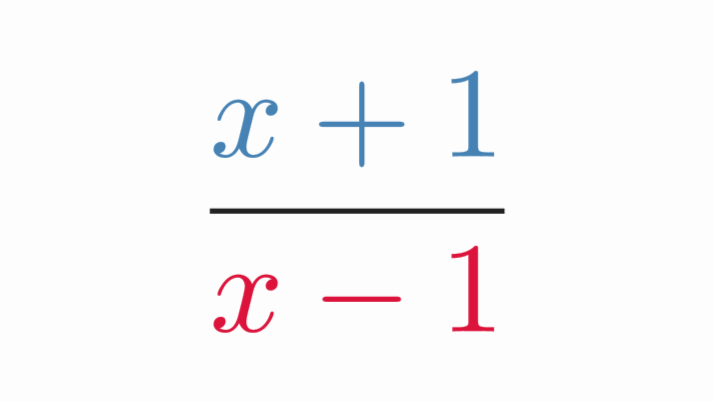
def eq = latex(
    text:        r'''$$
\frac
{\jmtag{numer}{x+1}}
{\jmtag{denom}{x-1}}
$$''',
    colorToTags: [
    ["steelblue", "numer"],
    ["crimson", "denom"]
    ]
)
scene.add(eq)
camera.zoomToAllObjects()
Generates this colored algebraic expression:
The DSL accepts the following ways to assign colors to tags:
| Form | Meaning |
|---|---|
["blue", "region1"] |
The glyphs of region1 |
["blue", "region1", "region2"] |
The glyphs of both regions |
[["blue", "lhs"], ["red", "rhs"]] |
Several color groups |
The color may be a name, a hex String or a PaintStyle object (a JMColor, a gradient...). The parameter is also available in ctLatex(...), and it is called colorToTag too, in case the singular reads better with a single region.
If you need something more permanent than a one-shot paint (a style you can reuse, register or reapply), use the tag key of the latexStyle(...) DSL instead:
latexStyle(apply: eq, rules: [
    [tag: "lhs", color: "steelblue"],
    [tag: "rhs", color: "crimson"],
])
Listing several names selects the union of their regions, so one rule can paint any number of them at once:
[tag: ["lhs", "rhs"], color: "gold"] //Both regions, one single rule
This is the only condition that behaves that way: every other key of a rule narrows the selection, while adding tag names widens it.
The Groovy way
The formula itself can hand you the shapes of a region, which is what you want when you are not coloring but animating:
def eq = LatexMathObject.make(r"$\jmtag{lhs}{x^2+1}=\jmtag{rhs}{\frac{a}{b}}$")
scene.add(eq)
camera.zoomToAllObjects()
eq.getShapesOfTag("rhs").color("crimson")
highlight(type: "twist", obj: eq.getShapesOfTag("lhs"))
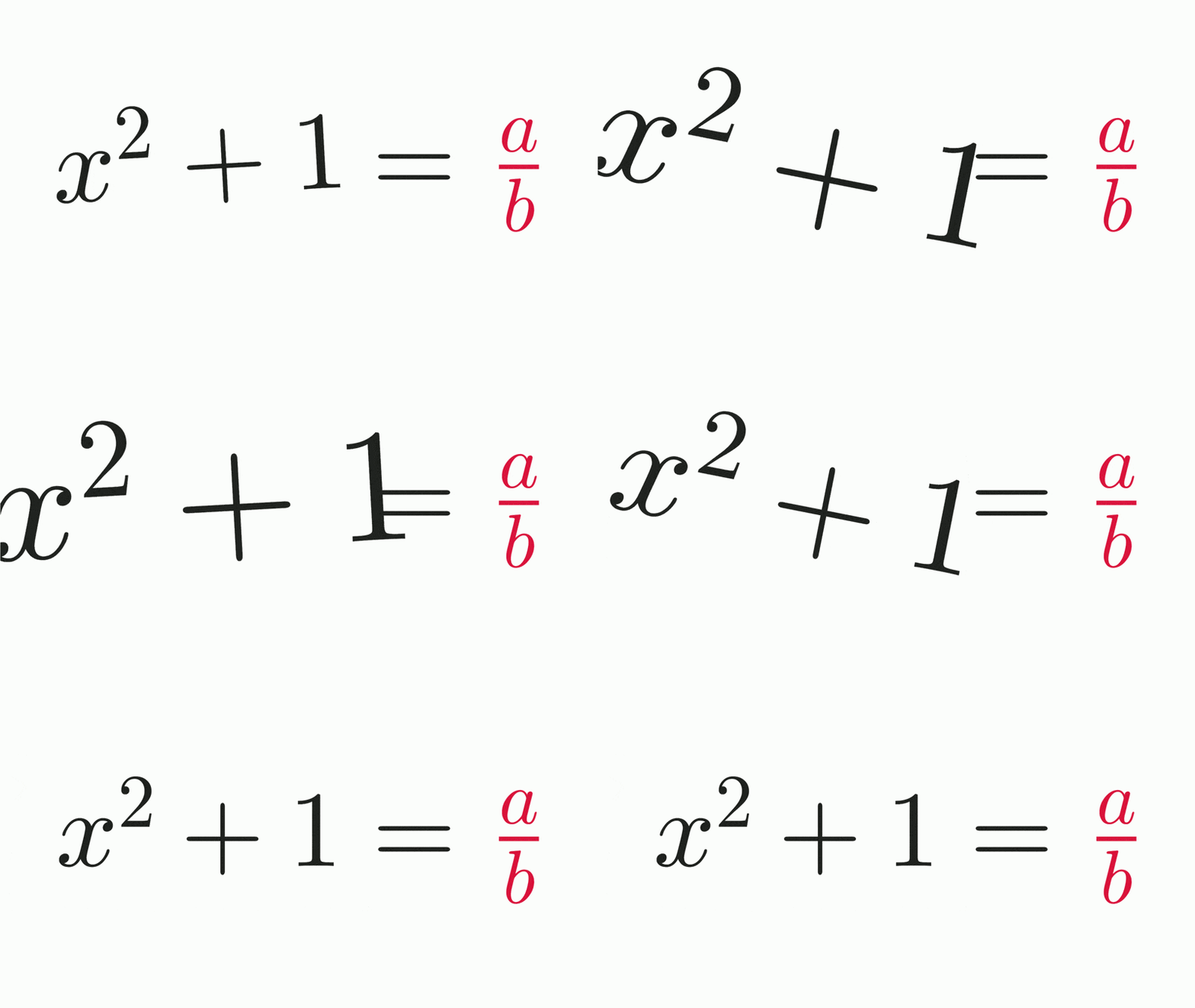
getShapesOfTag(name) returns a new formula-like object with the glyphs of that region, and getIndicesOfTag(name) returns their indices, should you prefer to work with those. And if you are building a LatexStyle by hand:
def style = LatexStyle.make()
style.add(LatexStyleItem.equalsTag("lhs", "steelblue"))
style.add(LatexStyleItem.equalsTag("rhs", "crimson"))
eq.setLatexStyle(style)
What can (and cannot) be tagged
Regions nest, and their names accumulate instead of replacing each other: a glyph written inside \jmtag{outer}{...\jmtag{inner}{x}...} carries both outer and inner, so either name finds it.
Two things to keep in mind:
- The macro only works with the in-process JLaTeXMath back-end, which is the default one. Under
CompileMode.CompileFilethe formula is typeset by an externallatexbinary, which is told to ignore the macro (the tags simply vanish). - The tagged code is parsed as a formula of its own, so a region must be a complete, balanced piece of LaTeX. You may tag a whole argument of a
\frac, a cell of a matrix, a summand, an entire environment... but never half a structure:
| This works | This does not |
|---|---|
\frac{\jmtag{a}{1+x}}{2} |
\jmtag{a}{\frac{1}}{2} (a \frac cut in two) |
x^\jmtag{a}{2} |
x\jmtag{a}{^2} (a ^ with no base inside) |
\jmtag{a}{\left(x\right)} |
\jmtag{a}{\left(x} (a \left with no \right) |
\begin{pmatrix}\jmtag{a}{1} & 2\end{pmatrix} |
\jmtag{a}{1 & 2} (the & belongs to the environment) |
In short: put the tag around a complete node of the formula, never across the boundary between two of them. Spacing is not affected by the tag, by the way: a \jmtag{op}{+} b still typesets + as the binary operator it is.
2. Coloring by tokens
Sometimes you cannot (or do not want to) touch the LaTeX source: the formula is generated somewhere else, or you want a rule like "every subscript in gold" that works on any formula. That is what tokens are for.
When the formula is compiled with JLaTeXMath, jmathanim assigns a LatexToken object to every generated LatexShape, holding everything it could find out about that glyph: its type, its LaTeX name, whether it sits in a subscript, how deep in fractions it is, and so on. A coloring rule is just a description of the tokens you want.
2.1 The point-and-click way: the LaTeX Style Editor
If writing rules feels like too much typing, the gui editor has you covered. The LaTeX Style Editor (Tools -> LaTeX Style Editor..., or Ctrl+Shift+E) lets you build them visually:
- Pick a formula to preview (the tool detects the LaTeX objects defined in your script).
- Add rules with the dialog controls ("this character gets this color", "everything in a subscript gets that one") and watch the preview recolor live as you edit.
- When it looks right, press Insert DSL Code: the tool writes the corresponding
latexStyle(...)block into your script.
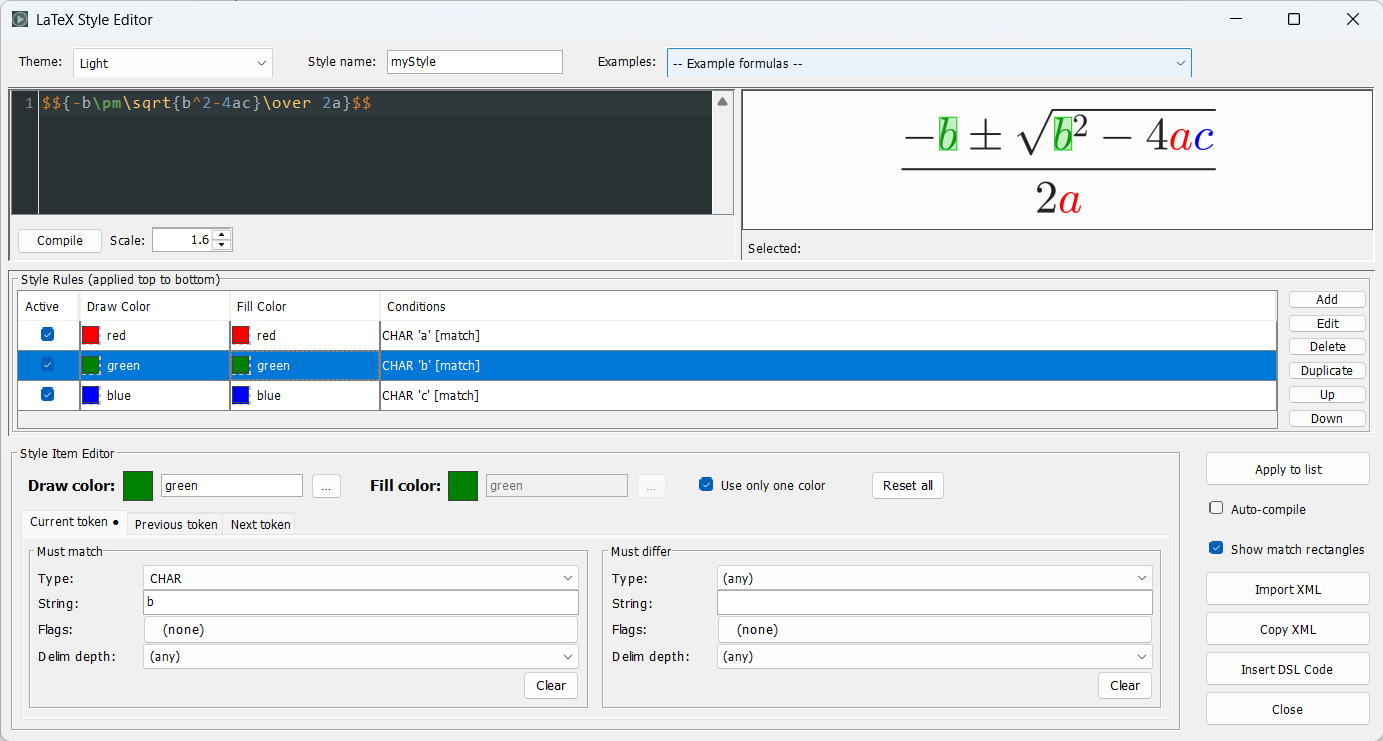
Hovering a glyph in the preview shows every attribute it carries, which is the fastest way of finding out what to write in a condition. As with the Transform LaTeX tool, the generated block is round-trippable: place the cursor inside it and reopen the editor to keep tweaking the rules visually. The dialog can also export the style as XML, ready to paste into a config file (see section 4).
2.2 The DSL way
The latexStyle(...) DSL describes a whole style declaratively. Each entry of rules is one coloring rule, applied in order, so a later rule overrides an earlier one on the glyphs they share:
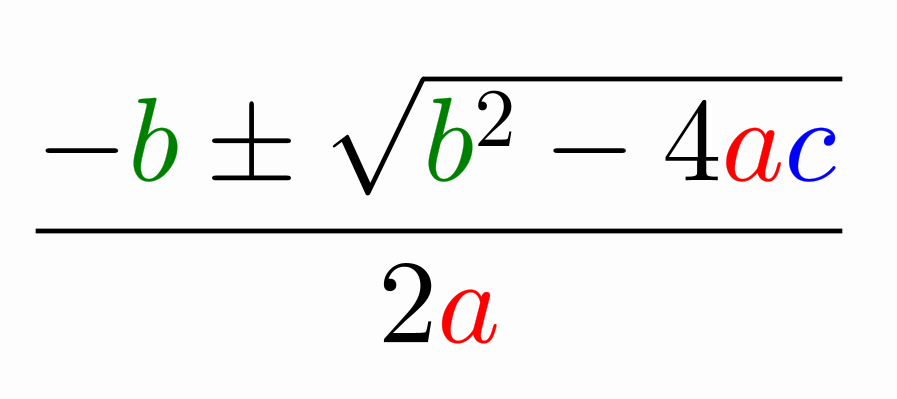
def formula = LatexMathObject.make(r"$${-b\pm\sqrt{b^2-4ac}\over 2a}$$")
latexStyle(apply: formula, rules: [
    [char: "a", color: "red"],
    [char: "b", color: "green"],
    [char: "c", color: "blue"],
])
scene.add(formula)
camera.zoomToAllObjects()
You should obtain something like this:
The char key is a shortcut matching a CHAR token with that exact string. For anything more precise, use a token spec: a map describing the token to match. For example, to colour X in steel blue and every subscript in gold:
latexStyle(apply: formula, rules: [
    [char: "X",                color: "steelblue"],
    [match: [subscript: true], color: "gold"],
])
A token spec accepts the keys type (char, number, greek_letter, binary_operator, relation, delimiter, operator, sqrt, fraction_bar, named_function, arrow, non_math_char), string (the LaTeX name of the glyph, also available as char), depth (delimiter depth), fracDepth (fraction depth), arg (argument index), tag (the regions of section 1) and boolean flags such as subscript, superscript, numerator, denominator, fromIndex, toIndex, bold, tt, ss, italic. Unset keys act as wildcards.
The fracDepth key is handy for nested fractions, where numerator and denominator only tell you about the innermost one. For example, to colour each level of a continued fraction differently:
latexStyle(apply: formula, rules: [
    [match: [fracDepth: 1], color: "steelblue"],
    [match: [fracDepth: 2], color: "orange"],
    [match: [fracDepth: 3], color: "crimson"],
])
The arg key selects the glyphs coming from a numbered argument, that is, the ones produced by substituting a {#n} placeholder. This is what lets you colour the values of a dynamic formula apart from its fixed skeleton, and it keeps working while the values change, since the style is reapplied on every recompilation:
def p = LatexMathObject.make(r"$({#0},{#1})$")
latexStyle(apply: p, rules: [
    [match: [arg: -1], color: "gray"],       //The parentheses and the comma
    [match: [arg:  0], color: "steelblue"],  //The x coordinate
    [match: [arg:  1], color: "crimson"],    //The y coordinate
])
An index of -1 (the constant LatexToken.NO_ARGUMENT) means "written literally in the formula", and selects everything that is not part of an argument. Note that these rules must come after any rule matching by type: a glyph of an argument is still a NUMBER, so an earlier [match: [type: "number"]] would claim it first.
Argument tagging, like the \jmtag regions, needs the in-process JLaTeXMath back-end (the default one). Under CompileMode.CompileFile no glyph carries an argument index.
Besides the current glyph (match / differ), a rule can constrain its neighbours with prev / prevDiffer and next / nextDiffer. Each of them takes a token spec, and a plain String is shorthand for [string: ...]. This is all you need for the classic matrix row/column problem: both indices are numbers in a subscript, and the only difference between them is the comma. Colour the ones followed by a comma (row) differently from those preceded by a comma (column):
latexStyle(apply: formula, name: "rowColMatrix", rules: [
    [color: "slateblue", match: [type: "number", subscript: true], next: ","],
    [color: "coral",     match: [type: "number", subscript: true], prev: ","],
])
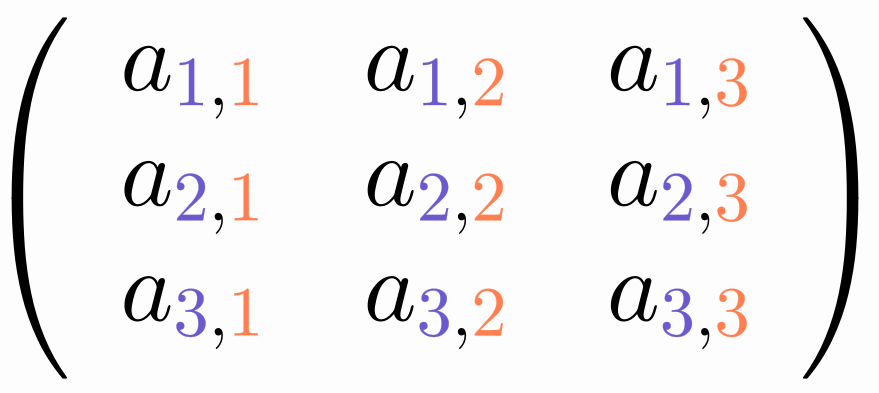
The optional name parameter registers the built style in the global config, so it can be reused later on any formula with formula.setLatexStyle("rowColMatrix") or latex(text: ..., latexStyle: "rowColMatrix"). Omit apply if you only want to build (and perhaps register) the style without attaching it to a formula yet. latexStyle(...) always returns the LatexStyle object.
Every rule also accepts a full style map (delegated to the styling DSL: thickness, drawColor, fillColor, fillAlpha, ...) or a named style String, instead of (or in addition to) the plain color.
Computed colors
(If you are satisfied with the previous methods to assign static colors, you can safely skip this section)
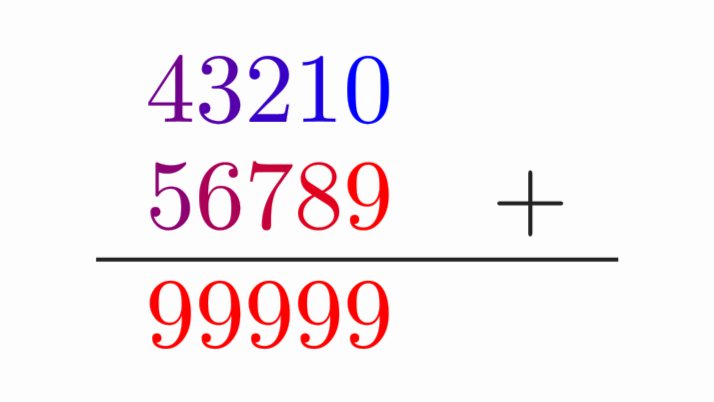
Token conditions can only say which glyphs get one fixed color. Some styles are not like that: think of colouring every digit with a ramp between two colors, where 0 gets the first one, 9 the second one, and the rest interpolate. No combination of matches can express that, because the color depends on the glyph. You could of course write 10 different rules, but there is a much more comfortable way (well, comfortable if you are not scared of "strange Groovy magic").
For those cases a rule can be a closure that is called once per glyph and returns its color:
def A = JMColor.parse("blue")
def B = JMColor.parse("red")
def formula = LatexMathObject.make(r'''$$
\begin{array}{rl}
    43210 &  \\
    56789 & +\\
    \hline
    99999
\end{array}
$$''')

latexStyle(apply: formula, rules: [
    [rule: { ctx -> ctx.isDigit() ? A.interpolate(B, ctx.digitValue / 9d) : null }],
])

scene.add(formula)
camera.zoomToAllObjects()
Generates an image with the glyphs 0-9 colored from red to blue:
Returning null means "not my glyph": it is left exactly as it was, so a programmatic rule mixes with the declarative ones in the same rules list, in the usual order. Besides null, the closure may return a color name or hex String, a PaintStyle (a JMColor, a gradient, ...) or a whole MODrawProperties.
The closure receives a LatexGlyphContext describing the glyph being styled:
| Property | Meaning |
|---|---|
token, previousToken, nextToken |
The LatexToken of the glyph and of its neighbours (out of range neighbours are NONE tokens) |
index, size(), tokens, getTokenAt(i) |
Position of the glyph, glyph count, and the whole token list |
string, type |
Shortcuts for token.string and token.type |
isDigit(), digitValue |
Whether the glyph is a digit 0-9, and its numeric value (-1 if it is not). Note that the NUMBER type also covers the decimal point, so isDigit() is the safe test |
fracDepth, delimiterDepth, hasFlag(flag) |
The remaining token attributes, e.g. ctx.hasFlag(LatexToken.SEC_SUBSCRIPT) |
tags, hasTag(name) |
The \jmtag regions the glyph lies in |
shape, latex |
The LatexShape being styled and the formula it belongs to, when the geometry matters |
A closure taking two parameters is called as { token, ctx -> ... }, for the frequent case where only the token is needed.
The declarative conditions can still do the selection work: written as color, the closure is only called on the glyphs that match the rest of the rule. So the previous example, restricted to the digits of a subscript, becomes:
latexStyle(apply: formula, rules: [
    [match: [type: "number", subscript: true],
     color: { ctx -> ctx.digitValue < 0 ? null : A.interpolate(B, ctx.digitValue / 9d) }],
])
Another example: A color for lowercase letters and another for uppercase (note that other glyphs like ? o ' are not colored)
def A = JMColor.parse("cadetblue4")
def B = JMColor.parse("slateblue4")
def formula = LatexMathObject.make(r'''
Why did Euler cross the bridges of Königsberg?\\
He didn't, and he proved no one could.
''')

//LaTeX has ligatures, so "ff" generates one token with name "ff"
//that's why we examine the fist char (charAt(0))
latexStyle(apply: formula, rules: [
    [rule: { ctx ->
        if (ctx.type != LatexTokenType.CHAR && ctx.type != LatexTokenType.NON_MATH_CHAR) return null
        char ch = ctx.string.charAt(0)
        Character.isLowerCase(ch) ? A : (Character.isUpperCase(ch) ? B : null)
    },
     dependsOn: [A, B]],
])
scene.add(formula)
camera.zoomToAllObjects()
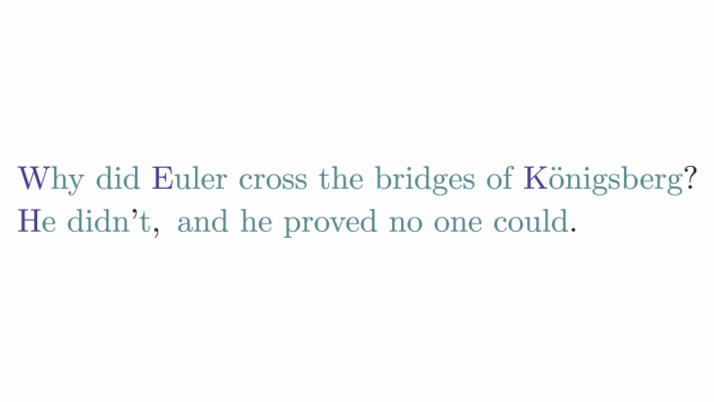
A couple of things worth knowing:
- The closure is called once per glyph every time the style is applied, which happens when the style is attached, when the formula is rebuilt (for instance after changing its text), and when something the style depends on changes (see below). Keep it a cheap, pure function of the context.
- A computed rule cannot be written in an XML config file nor edited in the visual style editor, which only understand token matching. Copies of the style share the closure, as a function cannot be duplicated.
Styles that react to their colors
A style is not a one-shot paint job: a formula keeps a live link to the style it was given, and recolors itself whenever the style changes. Editing a rule is enough:
latexStyle.getItem(0).setColor("green") //The formula turns green on the next frame
For a computed rule the colors live inside the closure, and only you know which objects it reads, so they have to be named with dependsOn:
def formula = latex(text: r'$124+875=999$')
def A = JMColor.parse('red')
def B = JMColor.parse('blue')

latexStyle(apply: formula, rules: [
    [rule: { ctx -> ctx.isDigit() ? A.interpolate(B, ctx.digitValue / 9d) : null },
     dependsOn: [A, B]],
])
scene.add(formula)
scene.waitSeconds(1)          //Digits interpolated from red to blue

A.copyFrom(JMColor.parse("white"))
B.copyFrom(JMColor.parse("black"))
scene.waitSeconds(1)          //Same formula, now from white to black
No re-apply, no setLatexStyle again: the formula sees that one of the objects its style depends on changed, and recomputes the colors of its glyphs (without recompiling the LaTeX, which stays untouched).
dependsOn accepts one object or a list, and takes anything that reports its own changes (a JMColor, a Scalar, a MathObject). Two details are worth remembering:
- The dependency tracks the object, not the variable. Mutating it (
A.copyFrom(...)) works; reassigning the variable (A = JMColor.parse("white")) leaves the rule pointing at the old color, and nothing happens. - Only declared objects count. A closure reading an undeclared color still paints correctly the first time, but the formula has no way of knowing when that color changes.
2.3 The Groovy way
Everything the DSL writes for you can be built by hand, which is what you need from Java, or when the rules are computed at runtime. The simplest case has its own shortcut:
def formula = LatexMathObject.make(r"$${-b\pm\sqrt{b^2-4ac}\over 2a}$$")
def latexStyle = LatexStyle.make()   //A latex style holds several "instructions"
latexStyle.setColorToChar("a", "red")    //All "a" glyphs should be red
latexStyle.setColorToChar("b", "green")  //All "b" glyphs should be green
latexStyle.setColorToChar("c", "blue")   //All "c" glyphs should be blue

formula.setLatexStyle(latexStyle)
scene.add(formula)
camera.zoomToAllObjects()
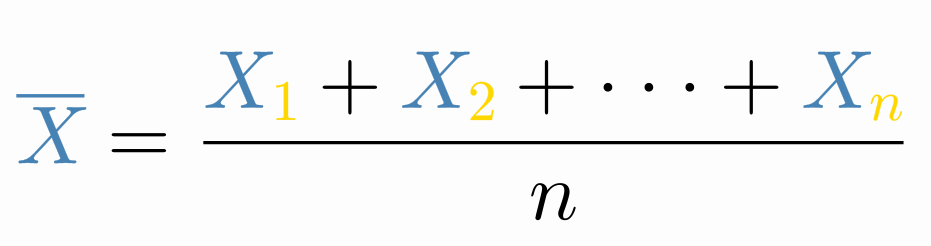
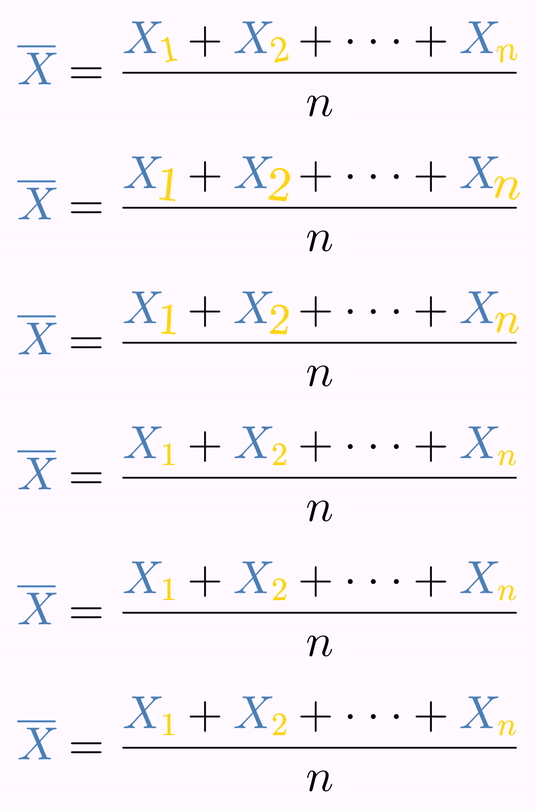
For the general case, a LatexStyle holds an arbitrary number of LatexStyleItem objects, and each of them compares the glyph against LatexToken objects. To colour every subscript in gold:
def formula = LatexMathObject.make(r"$$\overline{X}={X_1+X_2+\cdots+X_n\over n}$$")
def latexStyle = LatexStyle.make()
latexStyle.setColorToChar("X", "steelblue") //All "X" glyphs should be steelblue

def subscriptToken = LatexToken.make()   //A LatexToken with all attributes set to null
subscriptToken.activateSecondaryFlag(LatexToken.SEC_SUBSCRIPT)//Any token in a subscript matches this one

def latexStyleItem = LatexStyleItem.make("gold")//This item will apply the color gold to...
latexStyleItem.mustMatchTo(subscriptToken)      //...any token that matches the given token

latexStyle.add(latexStyleItem)

formula.setLatexStyle(latexStyle)
scene.add(formula)
camera.zoomToAllObjects()
You will get the following colored formula:
Tokens are not only for coloring: they also select precise shapes of the LatexMathObject. Adding these lines at the end of the previous code will twist and scale the subscripts to draw attention to them:
def subscriptPart = formula.getShapesWith(subscriptToken)//All LatexShapes matching subscriptToken
highlight(type: "twist", obj: subscriptPart.toShapesArray())//toShapesArray() passes each Shape as a separate argument
or, if you already have a LatexStyle object with the token you are interested in:
def subscriptPart = myStyle.getShapesFromRule(formula, 1) //Second rule (0-based list, remember!)
highlight(type: "twist", obj: subscriptPart.toShapesArray())
which generates an animation like this:
The matrix example of the DSL section, written by hand, shows how the neighbour conditions work:
def formula =
LatexMathObject.make(r"""$$\left(
                         \begin{array}{ccc}
                         a_{1,1} & a_{1,2} & a_{1,3} \\
                         a_{2,1} & a_{2,2} & a_{2,3} \\
                         a_{3,1} & a_{3,2} & a_{3,3}
                         \end{array}
                         \right)$$""")

scene.add(formula)
//This style will hold 2 latexStyle items,
//one for row and other for column subscripts
def latexStyle = LatexStyle.make()

//The style for the row subscript: applies to all
//subscript numbers with a comma immediately after
def rowSubscriptStyle = LatexStyleItem.make("slateblue")
rowSubscriptStyle.mustMatchTo(//Must be a number and a subscript
    LatexToken.make()
        .setType(LatexTokenType.NUMBER)
        .activateSecondaryFlag(LatexToken.SEC_SUBSCRIPT)
)
rowSubscriptStyle.nextTokenMustMatchTo(//The next token must be a comma
    LatexToken.make()
    //The real string name for this token is "comma",
    //but jmathanim translates most common signs to make it easier
        .setString(",")
)

//The style for the col subscript: applies to all
//subscript numbers with a comma immediately before
def colSubscriptStyle = LatexStyleItem.make("coral")
colSubscriptStyle.mustMatchTo(//Must be a number and a subscript
    LatexToken.make()
        .setType(LatexTokenType.NUMBER)
        .activateSecondaryFlag(LatexToken.SEC_SUBSCRIPT)
)

colSubscriptStyle.previousTokenMustMatchTo(//The previous token must be a comma
    LatexToken.make()
        .setString(",")
)

latexStyle.add(rowSubscriptStyle)
latexStyle.add(colSubscriptStyle)

formula.setLatexStyle(latexStyle)

camera.zoomToAllObjects()
Note that this code only works if the row and column indices consist of a single digit, because tokens work at the single glyph level. If you need more specialized results, you should write your own method to match tokens. For most purposes, however, the LatexStyle class is enough.
Computed colors have a programmatic form too. From Java (or when the style is built by hand rather than with the DSL) they are a LatexFunctionStyleItem, or the addFunction shortcut:
LatexStyle style = LatexStyle.make();
style.addFunction(ctx -> ctx.isDigit() ? A.interpolate(B, ctx.getDigitValue() / 9d) : null);
Both kinds of rule implement the LatexStyleRule interface, which is what a LatexStyle actually holds. Implementing your own kind of rule is a matter of extending AbstractLatexStyleRule and answering a single question: given the context of a glyph, which style does it get (or null to leave it alone)? The glyph iteration, the sanity checks and the style propagation are handled for you.
3. A closer look into the LatexToken class
Everything above rests on the tokens jmathanim generates while parsing the formula. This section describes what exactly is in them, so you know what you can ask for.
The tokens live in the LatexParser object of the formula, accessible through getLatexParser(). Let's have a look at an example that generates a simple and beautiful mathematical formula:
def eulerFormula=LatexMathObject.make(r"$e^{i\pi}+1=0$")
eulerFormula.latexParser.eachWithIndex() { token, i ->
    println "Token number " + i + ": " + token
}
You will see in the log output all the generated tokens:
Token number 0: LatexToken[CHAR, "e"] [delimDepth=0] SEC_NORMAL
Token number 1: LatexToken[CHAR, "i"] [delimDepth=0] SEC_SUPERSCRIPT
Token number 2: LatexToken[GREEK_LETTER, "pi"] [delimDepth=0] SEC_SUPERSCRIPT
Token number 3: LatexToken[BINARY_OPERATOR, "plus"] [delimDepth=0] SEC_NORMAL
Token number 4: LatexToken[NUMBER, "1"] [delimDepth=0] SEC_NORMAL
Token number 5: LatexToken[RELATION, "equals"] [delimDepth=0] SEC_NORMAL
Token number 6: LatexToken[NUMBER, "0"] [delimDepth=0] SEC_NORMAL
There are several useful attributes in the token. The first, the type, accessed through the getType() method, defines what family this glyph belongs to. Currently there are the following types, defined in the LatexTokenType enum:
public enum LatexTokenType {
    NONE, //This token will not be assigned never. It is used to always returns false when matching tokens
    NON_MATH_CHAR,//Normal, non mathematical text
    CHAR,//A char token, mostly a letter
    NUMBER, //0-9 digits, including point if used in the decimal context
    SYMBOL, //A math symbol
    OPERATOR, //A "big" operator like \sum, \int
    BINARY_OPERATOR, //A simpler binary operator like +, -, \cap,\cup...
    RELATION, // A math relation like =, \geq, \leq, etc.
    DELIMITER, //Parenthesis, brackets...of any size
    SQRT, // Square (or nth-) root symbol
    FRACTION_BAR, //That is, the fraction bar :-)
    GREEK_LETTER, //Any greek letter like \pi or \varepsilon
    NAMED_FUNCTION, //A named function like \log or \ln
    ARROW //An arrow
}
So, we can see the generated formula consists of 2 CHARs, a GREEK_LETTER (\pi), a BINARY_OPERATOR (\plus), etc.
The second LatexToken attribute is the string, accessible through the getString() method, which is basically the LaTeX command which generated the glyph, without the backslashes.
The getDelimiterDepth method returns the "depth" of the glyph in the delimiters, i.e. how many groups of delimiters the glyph is "buried" in. In the example above all glyphs have a delimDepth value of 0, as there are no parentheses or brackets (or any delimiters). A delimiter itself carries the depth of the group holding it, not of the group it opens, so both members of a pair share the same value: in $((x))$ the outer parentheses have depth 0, the inner ones 1, and the x 2.
The getFracDepth method does the same for fractions: it returns how many fractions the glyph is nested in. Unlike a delimiter, a fraction rule counts as part of the fraction it draws, so it always shares the depth of the numerator and the denominator it separates. In $\frac{\frac{a}{b}+z}{c}$ the outer rule, +, z and c have a fracDepth of 1, while a, b and the inner rule have 2.
The getArgIndex method tells which numbered argument the glyph comes from: the n of the {#n} placeholder whose substitution generated it. A glyph written literally in the formula returns LatexToken.NO_ARGUMENT (-1). The getShapesOfArg(n) and getIndicesOfArg(n) methods of the formula use exactly this to hand you back the glyphs of one argument, with getShapesOfArg(LatexToken.NO_ARGUMENT) giving the fixed part instead.
The getTags() method lists the names of the regions the glyph lies in, the ones you marked yourself with the \jmtag{name}{...} macro of section 1. It returns null for a glyph outside of any tagged region, and hasTag(name) answers the same question for a single name.
The getSecondaryFlags() method gets some bit flags to add additional classification to the token. Currently these are the various flags. You need to memorize them carefully (just kidding...)
public static final int SEC_NONE = 0b00000000;//None. A value of 0 should never be matched
public static final int SEC_NORMAL = 0b00000001;//This token is normal style, nothing special about it
public static final int SEC_DELIMITER_NORMAL = 0b00000010;//This token is a delimiter, normal size
public static final int SEC_DELIMITER_BIG1 = 0b00000100;//This token is a delimiter, \big size
public static final int SEC_DELIMITER_BIG2 = 0b00001000;//This token is a delimiter, \Big size
public static final int SEC_DELIMITER_BIG3 = 0b0000100000000000;//This token is a delimiter, \bigg size
public static final int SEC_DELIMITER_BIG4 = 0b0001000000000000;//This token is a delimiter, \Bigg size
public static final int SEC_DELIMITER_EXTENSIBLE = 0b00010000;//This token is a delimiter, extensible size
public static final int SEC_SUPERSCRIPT = 0b00100000;//This token is in a superscript
public static final int SEC_SUBSCRIPT = 0b01000000;//This token is in a subscript
public static final int SEC_FROM_INDEX = 0b10000000;//This token is in the "from" part of an \int, \sum...
public static final int SEC_TO_INDEX = 0b0000000100000000;//This token is in the "to" part of an \int, \sum...
public static final int SEC_NUMERATOR = 0b0000001000000000;//This token is in the numerator part of the innermost fraction holding it
public static final int SEC_DENOMINATOR = 0b0000010000000000;//This token is in the denominator part of the innermost fraction holding it
public static final int SEC_LEFT_ARROW = 0b0010000000000000; //This token is a left arrow
public static final int SEC_RIGHT_ARROW = 0b0100000000000000;//This token is a right arrow
public static final int SEC_LEFTRIGHT_ARROW = 0b1000000000000000;//This token is a leftright arrow
public static final int SEC_BOLD_FONT = 0b00010000000000000000;//This token is in bold math
public static final int SEC_TT_FONT = 0b00100000000000000000;//This token is in teletype (monospaced) math
public static final int SEC_SS_FONT = 0b01000000000000000000;//This token is in sans serif math
public static final int SEC_IT_FONT = 0b10000000000000000000;//This token is in italic math
How the comparison works
Each LatexStyleItem can use up to 6 LatexToken objects to compare:
latexStyleItem.mustMatchTo(token)//The token to be colored must match with this
latexStyleItem.mustDifferFrom(token)//The token to be colored must differ from this
latexStyleItem.previousTokenMustMatchTo(token)//The token previous to the one to be colored must match with this
latexStyleItem.previousTokenMustDifferFrom(token)//The token previous to the one to be colored must differ from this
latexStyleItem.nextTokenMustMatchTo(token)//The token after to the one to be colored must match with this
latexStyleItem.nextTokenMustDifferFrom(token)//The token after to the one to be colored must differ from this
It is important to note that "match" or "differ" means to match/differ in all its non-null attributes. That is, if we have a LatexToken object with all its attributes set to null except the string variable, an expression like latexStyleItem.mustDifferFrom(token) will return true for any token with a string different from token.string value, without taking into account the other attributes. Of course a LatexToken with all its attributes set to null will always return true to any match or differs method.
The tags are the one exception to that rule, as mentioned in section 1: they are a disjunction, so a token asking for two names matches a glyph lying in either of the two regions.
4. Storing styles in a config file
LaTeX coloring styles can be stored in config files too. The row/column matrix style used above looks like this:
<?xml version="1.0" encoding="UTF-8"?>
<JMathAnimConfig>
    <latexStyles>
        <latexStyle name="rowColMatrixStyle">
            <!--Row subscript-->
            <latexStyleItem>
                <conditions>
                    <equals>
                        <type>NUMBER</type>
                        <subtype>SEC_SUBSCRIPT</subtype>
                    </equals>
                    <equalsAfter>
                          <!-- <string>,</string> also works-->
                        <string>comma</string>
                    </equalsAfter>
                </conditions>
                <style>
                    <color>slateblue</color>
                </style>
            </latexStyleItem>
                <!--Column subscript-->
               <latexStyleItem>
                <conditions>
                    <equals>
                        <type>NUMBER</type>
                        <subtype>SEC_SUBSCRIPT</subtype>
                    </equals>
                    <equalsPrev>
                           <!-- <string>,</string> also works-->
                           <string>comma</string>
                    </equalsPrev>
                </conditions>
                <style>
                    <color>coral</color>
                </style>
            </latexStyleItem>
           </latexStyle>
    </latexStyles>
</JMathAnimConfig>
Save this file under your resources/config directory with a proper name (for example, matrixColor.xml) and load it with the following code:
//You can parse config files with styles
//in the runSketch() method at any time
config.parseFile("matrixColor.xml")
def formula =
LatexMathObject.make(r'''$$\left(
                         \begin{array}{ccc}
                         a_{1,1} & a_{1,2} & a_{1,3} \\
                         a_{2,1} & a_{2,2} & a_{2,3} \\
                         a_{3,1} & a_{3,2} & a_{3,3}
                         \end{array}
                         \right)$$''')
scene.add(formula)
LatexStyle latexStyle = config.getLatexStyles().get("rowColMatrixStyle")
formula.setLatexStyle(latexStyle)
camera.zoomToAllObjects()
The definition of a LatexStyleItem in XML format has the following syntax:
<latexStyleItem>
    <conditions>
        <equals>...</equals> <!-- Optional. Must match the conditions specified inside-->
        <equalsPrev>...</equalsPrev> <!-- Optional. Previous token must match the conditions specified inside-->
        <equalsAfter>...</equalsAfter> <!-- Optional. Next token must match the conditions specified inside-->
        <differs>...</differs> <!-- Optional. Must differ in at least one of the conditions specified inside-->
        <differsPrev>...</differsPrev> <!-- Optional. Previous token must differ in at least one of the conditions specified inside-->
        <differsAfter>...</differsAfter> <!-- Optional. Next token must differ in at least one of the conditions specified inside-->
    </conditions>
    <style>...</style> <!-- Style definitions here (see Chapter "Styling") -->
</latexStyleItem>
Each one of the six different condition types may have the following optional items <type>, <subtype>, <string>, <delimiterDepth>, <fracDepth>, <argIndex>, <tag>.
The <type> element, as its name says, defines the type token. For example the following definition:
<equals>
    <type>NUMBER</type>
</equals>
will match any LaTeX token which is a number, and
<differs>
    <type>GREEK_LETTER</type>
</differs>
will match any LaTex token which is not a Greek letter.
The element <subtype> will set the flags of the token. For example:
<equals>
    <subtype>SEC_NUMERATOR,SEC_SUBSCRIPT</subtype>
</equals>
will match any LaTeX token in a fraction numerator and in a subscript position.
The element
<differs>
    <subtype>SEC_FROM_INDEX</subtype>
</differs>
will match any LaTeX token which is not in the "from" position of an operator, like \int or \sum.
The element <string> refers to the LaTeX name this token has. Usually the character ("a") or the command without backslashes ("sqrt", "cdot", etc.). So, for example:
<differs>
    <string>x</string>
</differs>
Anything that is not the "x" char (case sensitive) will match this condition.
The element delimiterDepth sets how many delimiters embrace this token. So, for example
<equals>
    <delimiterDepth>0</delimiterDepth>
</equals>
will match any token which is not enclosed in any delimiter (parenthesis, brackets, etc.)
The element fracDepth does the same for fractions, counting a fraction rule as part of the fraction it draws:
<equals>
    <type>FRACTION_BAR</type>
    <fracDepth>2</fracDepth>
</equals>
will match the rule of any fraction nested inside another fraction.
The element argIndex matches the glyphs generated by the substitution of a {#n} placeholder:
<equals>
    <argIndex>0</argIndex>
</equals>
will match every glyph of the argument 0. A value of -1 matches the fixed part of the formula instead, the glyphs written literally in it.
Finally, the element tag matches the glyphs lying inside a region you named with the \jmtag macro of section 1:
<equals>
    <tag>lhs</tag>
</equals>
will match every glyph written inside a \jmtag{lhs}{...}. The element may be repeated, and unlike the rest of the items it is a disjunction: the glyph only has to lie in one of the regions listed, so several <tag> elements add their regions up.