Writing your own plugin
A word of warning before you start. This chapter is the odd one out. Everywhere else in this manual you only need to write a script; here you will write Java, compile it with Maven and produce a JAR file. If you have never done that, nothing bad will happen, but you may want to read sections 1 and 2, discover that you probably do not need a plugin at all, and come back another day. The rest of the manual does not depend on this chapter in any way.
If, on the other hand, you have written Java before and you are the sort of person who ends up with the same helper class copied into eleven different projects, welcome. This is your chapter.
Table of Contents
- 1. What a plugin is, and when you actually need one
- 2. First, the easy way: the
alwaysblock - 3. The ladder of reuse
- 4. What we are going to build
- 5. Step 1: the project
- 6. Step 2: the class
- 7. Step 3: the entry point
- 8. Step 4: the manifest
- 9. Step 5: build it
- 10. Step 6: load it in the editor
- 11. Step 7: use it
- 12. Step 8: ship snippets with it
- 13. Running it outside the editor
- 14. The edit, build, run loop
- 15. Things that bite
1. What a plugin is, and when you actually need one
A plugin is a JAR file with your own classes inside, plus one line in its manifest saying "hello, I am a JMathAnim plugin". Load it, and from that moment every script you write can use your classes by their short name, as if they had always been part of the library. Unload it and they are gone again.
That is the whole idea. The interesting question is not how to do it (that is the rest of this chapter) but whether you should. Be honest about which of these you are:
- "I want this point to follow that one." You do not need a plugin. You need eight lines of DSL. Read the next section and go make your animation.
- "I want to use this cool java library I found in my project. For example, a physics simulation library, or a graph library. If you want to use it in your animations, you have to write a layer between the library and your jmathanim objects. A plugin fits perfectly here.
2. First, the easy way: the always block
Our running example throughout the chapter is a point that always sits at the normalized coordinates of another point: same direction, length exactly 1. Move the source point wherever you like and the normalized one slides around the unit circle. It is the geometric picture of "divide a vector by its length", and it is genuinely nice to have on screen when you are explaining unit vectors.
Here it is, in plain DSL, with no plugin, no Java and no JAR:
def A = point(at: [1.5, .8], style: [drawColor: "blue", thickness: 50])
def N = point(at: [0, 0], style: [drawColor: "red", thickness: 50])

always(obj: N, dependsOn: A) { p ->
    double norm = A.v.norm()
    if (norm == 0) return false      // nothing to do, and nothing changed
    p.moveTo(A.v.normalize())
    true                             // yes, we moved it
}

scene.add(axes(), shape(type: "circle"), A, N)
animShift(obj: A, vector: [-1, -1.6], runtime: 3)
That is it. always(...) registers a piece of code that runs once per frame on the object named in obj:. The dependsOn: parameter is the important one: it tells JMathAnim that the closure reads from A, so A is updated first and N is marked as needing work whenever A moves. The returned boolean is a courtesy to the update system, false meaning "nothing changed, do not bother recomputing anything downstream". The Advanced topics chapter covers always in full.
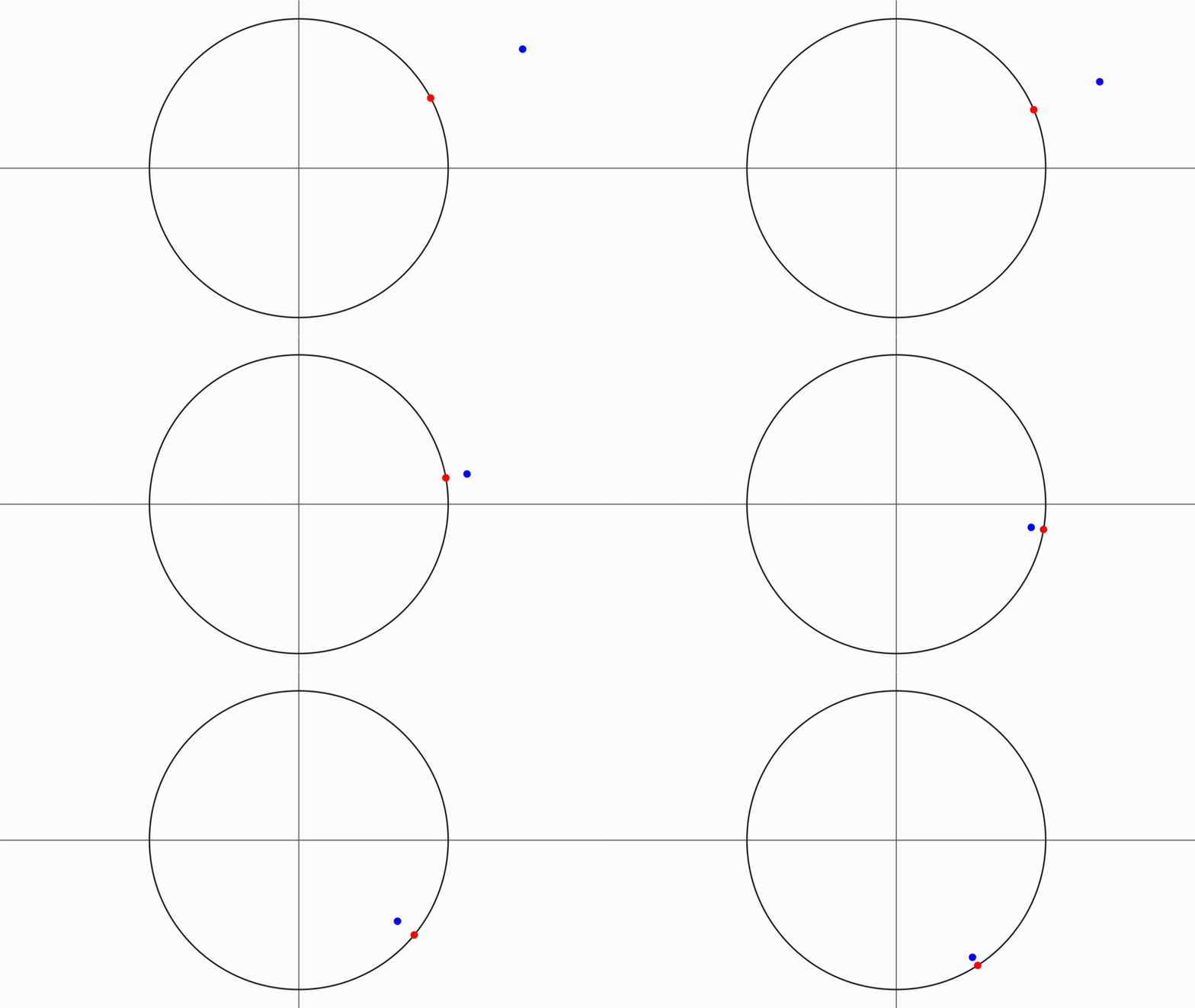
We will implement this same thing using a plugin.
3. The ladder of reuse
Between "closure in a script" and "plugin JAR" there are two rungs worth knowing, because you may never need to climb past them.
| Rung | What you do | Good for |
|---|---|---|
| A closure in the script | always(obj: N, dependsOn: A) { ... } |
One animation. The default. |
| A class in the same script file | class NormalizedPoint extends ... { } at the top of your .groovy |
One animation that needs a proper object. Recompiled on every run. |
| A class in its own file | NormalizedPoint.groovy next to the script, brought in with import("NormalizedPoint.groovy") |
A handful of scripts in the same folder. |
| A plugin JAR | This chapter | Use of third-party libraries. |
One rule applies to every rung above the first, and it surprises people: a class of your own does not get the DSL functions. Inside a class you write Shape.circle(), not shape(type: "circle"). The DSL lives in the script; your class uses JMathAnim as a plain library. This is even more true of a plugin, which is ordinary Java compiled long before any script exists.
4. What we are going to build
NormalizedPoint: a scene object that draws a dot at the normalized coordinates of another point, and keeps doing so forever, without anybody having to remember to update it.
The design decision, made before writing a line of code, is which existing class to extend. JMathAnim already has a family of objects for exactly this shape of problem: constructibles, the Geogebra-flavoured objects that are derived from other objects rather than moved around by hand. The midpoint of two points, the perpendicular bisector of a segment, the intersection of two circles, etc. Our normalized point is one more of these, so:
Constructible                       the base of everything derived
    CTAbstractPoint                 a constructible whose result is a point
        CTMidPoint                  the midpoint of two points
        CTIntersectionPoint         where two objects cross
        NormalizedPoint             ours
CTAbstractPoint hands us almost everything: a Point to draw, a Coordinates field called coordinatesOfPoint holding where it goes, styling, bounding box, and the promise that our rebuildShape() will be called on any frame where something we depend on has moved. We supply three things: a constructor, a rebuildShape() with the one line of mathematics, and a copy().
If you want to see the pattern in the wild before writing your own, open CTMidPoint in the JMathAnim sources. What follows is deliberately the same shape.
5. Step 1: the project
A plugin is an ordinary Maven project. Nothing about it is JMathAnim-specific except one dependency and five manifest lines.
Create a folder, anywhere you like, with this inside. You can create them manually or (better) using your favorite IDE, like NetBeans or Intellij:
normalized-point/
├── pom.xml
└── src/
    └── main/
        ├── java/
        │   └── com/example/jmaplugin/normalized/
        │       ├── NormalizedPoint.java
        │       └── NormalizedPointPlugin.java
        └── resources/
            └── jmathanim-snippets.yaml      (optional, section 12)
And this pom.xml: In this example I am using core version 1.4.8, you can use the latest available version:
<?xml version="1.0" encoding="UTF-8"?>
<project xmlns="http://maven.apache.org/POM/4.0.0"
         xmlns:xsi="http://www.w3.org/2001/XMLSchema-instance"
         xsi:schemaLocation="http://maven.apache.org/POM/4.0.0 http://maven.apache.org/xsd/maven-4.0.0.xsd">
    <modelVersion>4.0.0</modelVersion>

    <groupId>com.example</groupId>
    <artifactId>normalized-point</artifactId>
    <version>1.0.0</version>
    <packaging>jar</packaging>

    <properties>
        <maven.compiler.release>11</maven.compiler.release>
        <project.build.sourceEncoding>UTF-8</project.build.sourceEncoding>
    </properties>

    <dependencies>
        <dependency>
            <groupId>com.github.davidgutierrezrubio</groupId>
            <artifactId>jmathanim-core</artifactId>
            <version>1.4.8</version>
            <scope>provided</scope>
        </dependency>
    </dependencies>

    <build>
        <plugins>
            <plugin>
                <groupId>org.apache.maven.plugins</groupId>
                <artifactId>maven-jar-plugin</artifactId>
                <version>3.4.1</version>
                <configuration>
                    <archive>
                        <manifestEntries>
                            <JMAnimPlugin-Class>com.example.jmaplugin.normalized.NormalizedPointPlugin</JMAnimPlugin-Class>
                            <JMAnimPlugin-Name>Normalized point</JMAnimPlugin-Name>
                            <JMAnimPlugin-Version>1.0.0</JMAnimPlugin-Version>
                            <JMAnimPlugin-Description>A point that follows the normalized coordinates of another one</JMAnimPlugin-Description>
                            <JMAnimPlugin-MinCoreVersion>1.4.8</JMAnimPlugin-MinCoreVersion>
                        </manifestEntries>
                    </archive>
                </configuration>
            </plugin>
        </plugins>
    </build>
</project>
Two lines in there deserve a comment.
<scope>provided</scope> is not optional. It means "I need this to compile, but do not put it in my JAR, the host already has it". Forget it and Maven happily bundles a second copy of the whole JMathAnim library inside your plugin, which is a reliable way to get very confusing errors when the two copies disagree about what a Point is.
The version must match the core you actually run. Check yours in the editor (Help, About) and use that number in both the dependency and JMAnimPlugin-MinCoreVersion. This is the single most common cause of a plugin that refuses to load, and the log says so in as many words when it happens.
Bringing a third-party library along
If your reason for writing a plugin is the second one in section 1, wrapping a physics engine or a graph library, then this subsection is the one that matters, because the two dependencies pull in opposite directions:
jmathanim-coreisprovided. The host already has it. Shipping a second copy is the mistake described above.- Everything else has to travel inside your JAR. Your plugin's classloader sees its own JAR and the core, and nothing else. A library that is merely on Maven's compile classpath is not there at run time, and the plugin dies with
NoClassDefFoundErrorthe first time your code touches it.
Bundling is not what maven-jar-plugin does, so declare the library with the default scope (no <scope> line at all):
        <dependency>
            <groupId>org.dyn4j</groupId>
            <artifactId>dyn4j</artifactId>
            <version>5.0.2</version>
        </dependency>
and add maven-shade-plugin next to the jar plugin, which unpacks every non-provided dependency into the final JAR:
            <plugin>
                <groupId>org.apache.maven.plugins</groupId>
                <artifactId>maven-shade-plugin</artifactId>
                <version>3.5.3</version>
                <executions>
                    <execution>
                        <phase>package</phase>
                        <goals><goal>shade</goal></goals>
                    </execution>
                </executions>
            </plugin>
Keep the maven-jar-plugin block exactly as it was: shade rewrites the JAR that the jar plugin has just built, manifest included, so your JMAnimPlugin-Class line travels with it. Section 8 shows how to read it back out of the JAR if you want to be sure.
The result is a bigger file (dyn4j adds about half a megabyte) and a completely self-contained one, which is exactly what you want for something you are going to email to a colleague. And if two plugins bundle the same library, nothing breaks: each has its own classloader and its own copy. Wasteful, isolated, and it works.
6. Step 2: the class
Start with the skeleton, which will not compile yet but shows the shape of the thing:
package com.example.jmaplugin.normalized;

import com.jmathanim.mathobjects.constructible.points.CTAbstractPoint;
import com.jmathanim.mathobjects.points.Coordinates;

public class NormalizedPoint extends CTAbstractPoint<NormalizedPoint> {

    private final Coordinates<?> source;

    private NormalizedPoint(Coordinates<?> source) {
        this.source = source;
    }

    @Override
    public void rebuildShape() {
        // the mathematics goes here
    }

    @Override
    public NormalizedPoint copy() {
        return null;    // for now...
    }
}
Three remarks on that skeleton, because each one is a decision and not a formality:
extends CTAbstractPoint<NormalizedPoint>, with our own class inside the angle brackets. That is not a typo and not a copy-paste accident. It is what makes myPoint.drawColor("red").thickness(20) give you back a NormalizedPoint instead of some anonymous base class, so you can keep chaining without casts. Put anything else in there and it will compile and then throw a ClassCastException the first time a method returns this.
The constructor is private. Users go through a static make(...) factory instead, for the reason we are about to see: an object of this kind is not finished when its constructor ends, it still has to declare what it depends on.
The field is Coordinates<?>, not Point. Coordinates is the interface for "anything that has coordinates", implemented by Point, by Vec, and by every constructible point including our own. Taking the interface means NormalizedPoint.make(...) accepts all of them, and in particular that you can normalize a normalized point, which is silly but should not be an error.
The factory
    /**
     * Creates a point at the normalized coordinates of the given one.
     *
     * @param source The point to normalize
     * @return The created object
     */
    public static NormalizedPoint make(Coordinates<?> source) {
        NormalizedPoint result = new NormalizedPoint(source);
        result.addDependency(source);
        result.update();
        return result;
    }
addDependency(source) is the line that makes the whole thing work, and it is worth understanding rather than copying.
JMathAnim does not re-evaluate every object on every frame. That would be correct but unbearably slow. Instead, every object carries a version number, and objects declare what they read from. When you move A, its version changes, and everything that declared a dependency on A is marked as needing a rebuild, in the right order, before the frame is drawn. Nothing else is touched.
So addDependency is you saying two things at once: "update A before me" and "when A changes, I have changed too". Leave it out and your point will be built once, look perfectly correct in the first frame, and then never move again. This is easily the most common bug in a first plugin, and the symptom (a static object that should be moving) does not look like a dependency problem at all.
update() at the end just builds the object once, so it is already in the right place before the first frame rather than one frame late.
The mathematics
    @Override
    public void rebuildShape() {
        if (!isFreeMathObject()) {
            coordinatesOfPoint.copyCoordinatesFrom(source.getVec().normalize());
        }
        super.rebuildShape();
    }
That is the entire content of our object: one line. rebuildShape() is called only on frames where something we depend on has actually changed, so this is the cheapest possible arrangement.
The details:
Vec.normalize()returns a new vector of length 1, leaving the original alone, and returns a plain copy when the vector is null (so a point sitting exactly on the origin does not produce infinities, it just stays there). There is alsonormalizeInPlace(), which modifies the vector it is called on; using that one here would normalize the user's pointAitself, which would be a memorable bug.copyCoordinatesFrom(...)and notsetX(...),setY(...). Writing coordinates one axis at a time bumps the version of the vector three times and, worse, leaves it briefly in a half-updated state that something else may read. Always write coordinates in one go.isFreeMathObject()is the escape hatch every constructible has: when a user callssetFreeMathObject(true), they are saying "stop deriving this, I want to animate the drawn point by hand". Respecting the flag costs oneifand means your object plays nicely with the rest of the library.super.rebuildShape()at the end copiescoordinatesOfPointinto thePointthat actually gets drawn. Forget it and your object will be in the right place mathematically and drawn in the wrong one, which is a fun afternoon.
The copy
    @Override
    public NormalizedPoint copy() {
        NormalizedPoint copy = new NormalizedPoint(source.getVec().copy());
        copy.copyStateFrom(this);
        return copy;
    }
copy() is required, and not decorative. Animations copy objects constantly, behind your back: Transform interpolates between copies, growIn needs a copy of the final state, and every save-and-restore of the scene does too. An object that cannot copy itself properly degrades quietly over the course of an animation.
Note what the copy is attached to: source.getVec().copy(), a frozen snapshot of where the source was, not the source itself. The copy is a photograph, not a second live object wired to your original. That is what you want: a copy that kept following A would mean that a Transform between two of these would drag the original around while it played.
The copyStateFrom method helps you a lot when doing copies as it copies the common properties of any MathObject like style, shape points, etc.
The rule of thumb in the copy() method should be "Build an exact copy of the object as it is now, but be sure the copy is independent from the original".
The finished class
package com.example.jmaplugin.normalized;

import com.jmathanim.mathobjects.constructible.points.CTAbstractPoint;
import com.jmathanim.mathobjects.points.Coordinates;

/**
 * A point located at the normalized coordinates of another one: same direction,
 * length 1. It follows the source point on every frame.
 */
public class NormalizedPoint extends CTAbstractPoint<NormalizedPoint> {

    private final Coordinates<?> source;

    private NormalizedPoint(Coordinates<?> source) {
        super();
        this.source = source;
    }

    /**
     * Creates a point at the normalized coordinates of the given one.
     *
     * @param source The point to normalize
     * @return The created object
     */
    public static NormalizedPoint make(Coordinates<?> source) {
        NormalizedPoint result = new NormalizedPoint(source);
        result.addDependency(source);
        result.update();
        return result;
    }

    @Override
    public void rebuildShape() {
        if (!isFreeMathObject()) {
            //normalize() returns a new vector, so the source point is left alone
            coordinatesOfPoint.copyCoordinatesFrom(source.getVec().normalize());
        }
        super.rebuildShape();
    }

    @Override
    public NormalizedPoint copy() {
        //The copy is a snapshot: it must not stay wired to the original source
        NormalizedPoint copy = new NormalizedPoint(source.getVec().copy());
        copy.copyStateFrom(this);
        return copy;
    }
}
Thirty lines, comments included. Everything else came from CTAbstractPoint.
7. Step 3: the entry point
The class above is just a class. To make the JAR a plugin, one class in it has to implement JMAnimPlugin, and that is the class the manifest points at.
Every method of the interface has a default implementation, so a minimal plugin overrides exactly one of them:
package com.example.jmaplugin.normalized;

import com.jmathanim.core.groovy.JMAnimPlugin;

/**
 * Entry point of the plugin. Declared in the manifest as JMAnimPlugin-Class.
 */
public class NormalizedPointPlugin implements JMAnimPlugin {

    @Override
    public String[] getPackages() {
        return new String[]{"com.example.jmaplugin.normalized"};
    }

    @Override
    public String getName() {
        return "Normalized point";
    }

    @Override
    public String getDescription() {
        return "Adds NormalizedPoint, a point that follows the normalized coordinates of another one.";
    }
}
getPackages() is the one that earns its keep. Every package listed there gets star-imported into every script while the plugin is loaded, which is why scripts can write NormalizedPoint.make(A) and not com.example.jmaplugin.normalized.NormalizedPoint.make(A). Return an empty array and your plugin still loads, it is just tedious to use.
The other two are cosmetics for the plugin manager, and both fall back to the manifest if you do not override them.
There are two more methods you will not need today but should know exist:
init(scene)runs once per scene, right before a script that can see your plugin is compiled. This is where you would register a custom style, a LaTeX macro, or anything else the scene must know about. It is not called when the plugin is loaded from the menu, because at that moment there is no scene yet.dispose(scene)runs when the plugin is unloaded, and its job is to undo exactly whatinitdid. Ifinitregisters something global anddisposedoes not remove it, unloading your plugin leaves debris behind.
Leave both alone unless you need them. A plugin that only wants its classes reachable does not.
8. Step 4: the manifest
Maven has already done this step for you, so there is nothing to write here. The <manifestEntries> block of section 5 ends up in META-INF/MANIFEST.MF, a small text file that lives inside the JAR and that the jar plugin generates at build time. This section is here so that you recognise the thing when you meet it, and because anyone building the JAR without Maven (Gradle, an IDE, jar by hand) does have to write it by hand.
This is what it looks like:
JMAnimPlugin-Class:          com.example.jmaplugin.normalized.NormalizedPointPlugin
JMAnimPlugin-Name:           Normalized point
JMAnimPlugin-Version:        1.0.0
JMAnimPlugin-Description:    A point that follows the normalized coordinates of another one
JMAnimPlugin-MinCoreVersion: 1.4.8
Only the first line is required. It has to be the fully qualified name of the class implementing JMAnimPlugin, and it has to be spelled correctly, because a typo there produces "failed to load" and nothing more helpful.
JMAnimPlugin-MinCoreVersion is checked before anything else is touched. Declaring it honestly is a kindness to your future self: without it, a plugin built against an old core loads happily and then explodes somewhere deep inside an animation with an error that mentions nothing about plugins.
A JAR is a ZIP file, so once you have built one you can read its manifest back and check that your lines really are in there:
unzip -p target/normalized-point-1.0.0.jar META-INF/MANIFEST.MF
9. Step 5: build it
mvn clean package
Out comes target/normalized-point-1.0.0.jar. That single file is the plugin. It is a few kilobytes, it contains two classes, and it is what you send to another user who wants to use it.
If Maven cannot find jmathanim-core, check that the version in your pom.xml matches a released one, and that you are online for the first build (after that it is cached in your local repository).
10. Step 6: load it in the editor
Three ways in, depending on how permanent you want this to be.
Just for now. Menu Plugins, then Load Plugin.., and pick the JAR. It is loaded immediately and remembered in the list.
For this project. Copy the JAR into the project's resources/plugins/ folder and load it from there. The project file remembers it, so opening the project loads the plugin and closing the project unloads it. This is the right choice for a plugin that belongs to one course or one set of videos, and it means the project folder stays self-contained: zip it, send it, and it works on the other end.
For every project, always. Drop the JAR into the editor's own plugins folder, which the Open Plugins Folder menu item takes you to:
| System | Folder |
|---|---|
| Windows | %APPDATA%\JMathAnim\plugins |
| macOS | ~/Library/Application Support/JMathAnim/plugins |
| Linux | ~/.config/jmathanim/plugins |
Anything sitting there is offered by the plugin manager without you having to add it by hand. Then open Plugins, Manage Plugins... and tick the At start-up box on its row, and it will be there every time you open the editor.
The manager is also where you go when something is wrong. It lists every JAR it knows about with its name, version, status (Loaded, Not loaded or Missing) and full path, which answers most of the questions you will have.
One rule the editor enforces: plugins cannot be loaded or unloaded while an animation is running. Stop the preview first. This is not fussiness, the code being unloaded may be executing at that moment.
11. Step 7: use it
With the plugin loaded, the class is simply there:
def A = point(at: [1.5, .8], style: [drawColor: "blue"])
def N = NormalizedPoint.make(A).drawColor("red").thickness(20)

scene.add(axes(), shape(type: "circle"), A, N)
animShift(obj: A, vector: [-3, -1.6], runtime: 3)
No import, no annotation, no ceremony. Compare it with the always version in section 2: the closure is gone, the dependency bookkeeping is gone, and what is left says what it means.
And because NormalizedPoint is a real object rather than a piece of behaviour bolted onto a generic point, the rest of the library now works on it. You can stack a label to it, animate it into existence, give it a dot style, use it as the endpoint of a segment, or feed it to another NormalizedPoint:
def A = point(at: [2, 1])
def N = NormalizedPoint.make(A).drawColor("red")
def M = NormalizedPoint.make(N).drawColor("orange")   // already normalized, so it sits on N
scene.add(axes(), shape(type: "circle"), A, N, M,
          ctSegment(A: [0, 0], B: A, style: [drawColor: "gray"]))
12. Step 8: ship snippets with it
Your plugin can put its own buttons in the editor's snippet sidebar. This is the part that turns "a JAR I have to explain to people" into "a JAR people can use without being told anything", so it is worth the ten minutes.
Put a file named jmathanim-snippets.yaml in src/main/resources/, that is, at the root of the JAR. It uses the same format as the editor's own snippet catalogue:
categories:
  - name: "Points"
    snippets:
      - kind: groovy
        label: "Normalized point"
        description: "A point that always sits at the normalized coordinates of another point: same direction, length 1."
        scope: anywhere
        template: "NormalizedPoint.make($0)"

      - kind: groovy
        label: "Normalized point demo"
        description: "A source point, its normalized point and the unit circle, ready to animate."
        template: |
          def A = point(at: [1.5, .8], style: [drawColor: "blue"])
          def N = NormalizedPoint.make(A).drawColor("red").thickness(20)
          scene.add(axes(), shape(type: "circle"), A, N)
          $0
The fields:
kind: groovymeans "insert this text verbatim". It is the right kind for a plugin: the other kinds (ct,anim,attributeand friends) describe DSL calls, and your plugin adds classes rather than DSL entries.labelis the text on the button,descriptionis its tooltip and the help line in the quick-pick palette. Write a real sentence there; it is what people read when deciding whether to press the thing.templateis the inserted text, with a single$0marking where the cursor lands afterwards. YAML block scalars (|) keep multi-line templates readable.scopeisstatementby default forgroovysnippets, meaning the snippet can only be inserted where a whole statement makes sense.anywherealso allows it inside another call, which is what you want for a one-liner likeNormalizedPoint.make($0)that people will drop into the middle of an expression.
If you only have two or three snippets and no need for grouping, skip the categories level and write a flat list:
snippets:
  - kind: groovy
    label: "Normalized point"
    description: "A point at the normalized coordinates of another one."
    template: "NormalizedPoint.make($0)"
They appear in the sidebar under Plugins / Normalized point / ..., using the plugin's display name, and they vanish the moment the plugin is unloaded. Nothing to clean up.
13. Running it outside the editor
Scripts can be run headlessly, straight from the command line, without the editor being involved at all. In that world there is no Plugins menu to load anything, so the script has to say what it needs:
@JMPlugin("normalized-point-1.0.0.jar")

def A = point(at: [1.5, .8])
def N = NormalizedPoint.make(A).drawColor("red")
scene.add(axes(), shape(type: "circle"), A, N)
animShift(obj: A, vector: [-3, -1.6], runtime: 3)
The annotation goes on its own line, usually at the very top. JMathAnim reads it before compiling anything, loads the JAR and removes the line from the source.
Where does it look for that file? Given a bare file name like the one above, in this order:
resources/plugins/inside the script's folder (the natural home, and the reason projects have that folder),- the script's own folder,
- among the plugins that are already loaded, matched by file name.
You can also give a path with a folder in it (libs/normalized-point-1.0.0.jar), resolved against the script's folder, or an absolute path, which works but makes the script unportable.
That third case in the list is what makes @JMPlugin harmless inside the editor: if the plugin is already loaded from the menu, the annotation finds it and does nothing. So the habit worth acquiring is to write @JMPlugin in any script you might ever run outside the editor, and let it be redundant the rest of the time.
14. The edit, build, run loop
Once you start actually developing a plugin rather than just using one, the cycle is:
- Change the Java,
mvn package. - Copy the JAR over the one the editor is using (or point the editor at
target/in the first place, which saves the copying). - Press Run.
Step 3 picks up the new code by itself. JMathAnim notices that the JAR's timestamp changed and reloads it before running the script, so you do not need to unload, reload, or restart the editor between builds. If the copy fails with "file in use", something is still holding the JAR: stop the running animation, or unload the plugin from the manager, which closes the file handle.
When something does go wrong, the log window is the place to look. Load failures, missing manifests, version mismatches and initialization errors are all reported there by name, and a version mismatch says so explicitly rather than making you guess.
15. Things that bite
Forgetting addDependency. Your object is built once and then sits there, perfectly correct and completely motionless. Nothing errors, nothing warns. If your plugin object refuses to follow anything, this is the first thing to check.
Bundling the core into your JAR. Symptoms are a JAR of 2-3 megabytes minimum, and then bizarre errors where an object "is not a MathObject" despite obviously being one, because there are two copies of the class loaded and they are not the same class. <scope>provided</scope> prevents it.
Building against a different core than you run. The plugin fails to load with a NoSuchMethodError, a NoClassDefFoundError or an AbstractMethodError, and the log tells you to rebuild it. Believe the log.
Expecting DSL functions inside your class. A plugin is plain Java. shape(type: "circle") does not exist there; Shape.circle() does. The DSL lives in the script, not in the library.
Writing coordinates one axis at a time. setX(...) then setY(...) bumps versions twice and exposes a half-written position to anything that reads in between. copyCoordinatesFrom(...) writes them together.
Doing expensive work in rebuildShape(). It runs on any frame where a dependency changed, which during an animation means every frame. Compiling a LaTeX formula or rebuilding a path there will be felt. Compute what you can once, in the factory, and leave the per-frame method to arithmetic.
A copy() that keeps a live reference to the original's source. Copies are made constantly by animations, and one that stays wired to the original will drag it around when it plays. Copy the source's coordinates, do not share the source.
Two plugins with the same display name. Only the first one's snippets are shown, and the log says so. Give yours a name of its own.
Forgetting to bundle a third-party library. Everything compiles, the plugin loads, and then the first call into the library throws NoClassDefFoundError. Compile scope is not run-time presence; see the shade plugin in section 5.
Plugins cannot see each other. Each one gets its own classloader, deliberately, so that unloading one does not disturb the rest. If your plugin needs classes from another plugin, it has to bundle them.
That is the whole machinery. The example here is a thirty-line class, and honestly most useful plugins are not much bigger: an object you kept rewriting, wrapped once, given a name, and shipped as a file. The hard part was never the JAR. It was noticing that you had written the same thing six times.